Primary Zelda Hacking
April 21, 2014, 10:51:48 PM *
Welcome, Guest. Please login or register.
Did you miss your activation email?

Login with username, password and session length
News: The website has switched hosts and now has the domain zeldahacking.net!
 
  Home Help Search Login Register  
  Show Posts
Pages: 1 ... 15 16 [17] 18 19 ... 38
241  Oracles Hacking / Projects / Re: The Oracle Project on: March 09, 2011, 07:15:24 AM
There are a lot of mapping errors in the maps you provided.

1. The waterfall tile - Was already pointed out
2. Water connecting to land without the transition tiles like on the map with the house
3. Ledge borders getting cut off when they should end
4. Tall grass next to trees and regular land when they shouldn't be - they were made for being inside the green grass.
5. There's some trees on maps that don't have the proper corners on the other maps, like in the top left of the screen below the building in the graveyard.
6. The mountain walls on the screen to the graveyard building have no start along with the edges getting cut off
7. The graveyard building is placed incorrectly - the walls it's intercepting don't end and are just cut off
8. The top of that house has no real top. I don't know what you did to remove the edges of the roof but it doesn't have one.
9. The borders of the trees are white, meaning they shouldn't be directly connected to grass like they are in the graveyard. There's tons of examples in the games how the ground is supposed to look next to trees
10. Not a mapping error, but it's very bad to have something like a rock or a bush on the edge of a screen. Sure you can lift or chop it to progress to the next screen, but when you come back, the tile will be there and you'll be stuck.

Sorry, but the errors were just bugging me. The mapping is pretty good otherwise.
242  Oracles Hacking / Opinions and Experiments / Re: Goron Mines - Dungeon 1 on: March 07, 2011, 10:00:01 PM
I like this idea, looks real natural and nice use of asm and mine carts. Tongue
He didn't modify any assembly.
243  The Site / Announcements / Rules on: March 02, 2011, 01:24:11 AM
Follow these rules and the forum should be a happy place. Smiley

-No flaming
-No spam
-Use common sense
-Try before asking. We'll try to help to the best of our ability, but don't take advantage by asking to be spoonfed if you haven't given it your all.
-Posts pertaining to jokes are allowed.
-"N" number of posting is allowed. Please post as many times in a row as you want. If you have something to say, say it.

~Lin
244  Oracles Hacking / ZOSE / Re: ZOSE Version 1.04 Released! on: February 28, 2011, 05:42:05 AM
Released 1.04. Fixed several bugs, including free space finder bugs and jump2byte compiling bugs and some warning and double-check systems for safety.
245  Oracles Hacking / Projects / Re: Oracle of Seasons - Soul Tower on: February 27, 2011, 08:09:45 PM
I'm going more for puzzles and running-back than toughness, although there is a point in the hack right now where you can't even get past it without getting hurt.
246  Oracles Hacking / Bug Reports / Re: Something got broken with Ages editing. on: February 26, 2011, 10:25:15 PM
This is intentional because of full tileset editing.
247  General GameBoy Hacking / General GameBoy Talk / Re: ASM request: LA DX gba color adjust from Oracle games on: February 26, 2011, 06:42:46 AM
I don't know how palettes get written, or oam is set to actually show up, or anything like that. If I knew I'd be able to debug and give you the code.
248  Other / Programming Discussion / C# - Using DirectDraw in a Window on: February 26, 2011, 06:35:46 AM
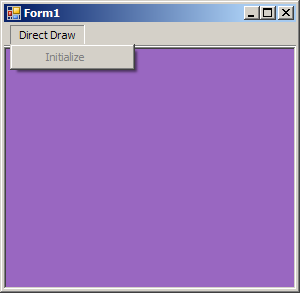
Hi there. Recently I've been wanting to use the longly-deprecated DirectDraw, but the tutorials out there only existed for full screen. I didn't want to force myself to go with it and I knew there had to be a way, as BGB does it. So, using the fullscreen code as a reference, I decided to get dirty and try it myself. After a while of experimenting, I finally got it.


As you can see, we can have controls, things over the window DirectDraw is being used in, and even border that window. In the screenshot the surface (A 3D bordered panel) is being cleared using a random color. It's extremely fast and you can't even see the whole window one color at once. But anyway, here's the code.

Code:
using System;
using System.Collections.Generic;
using System.ComponentModel;
using System.Data;
using System.Drawing;
using Microsoft.DirectX;
using Microsoft.DirectX.DirectDraw;
using System.Text;
using System.Windows.Forms;
using System.Runtime.InteropServices;

namespace WindowedDD
{
public partial class Form1 : Form
{
[DllImport("user32.dll")]
static extern bool ClientToScreen(IntPtr hWnd, ref Point lpPoint);

public Device dddevice = null;
public Surface primary;
public Surface secondary;
private Rectangle drawingRectangle;

public Form1()
{
InitializeComponent();
this.Show();
}

public void Init()
{
SurfaceDescription description = new SurfaceDescription();

description.SurfaceCaps.PrimarySurface = true;
primary = new Surface(description, dddevice);
Clipper pclipper = new Clipper(dddevice);
pclipper.Window = panel1;
primary.Clipper = pclipper;

description.Clear();
description.SurfaceCaps.OffScreenPlain = true;
description.Width = this.ClientSize.Width;
description.Height = this.ClientSize.Height;
secondary = new Surface(description, dddevice);
}

private void CalculateDrawPoint()
{
drawingRectangle = new Rectangle();
Point p = new Point();
ClientToScreen(this.Handle, ref p);
drawingRectangle.X = p.X;
drawingRectangle.Y = p.Y;
drawingRectangle.Width = this.ClientSize.Width;
drawingRectangle.Height = this.ClientSize.Height;
}

private void Loop()
{
Random r = new Random(255);
CalculateDrawPoint();
do
{
if (!this.Focused)
{
Application.DoEvents();
}
else
{
secondary.ColorFill(Color.FromArgb(r.Next(255), r.Next(255), r.Next(255)));
primary.Draw(drawingRectangle, secondary, DrawFlags.Wait);
Application.DoEvents();
}
} while (this.Created);

secondary.Dispose();
primary.Dispose();
dddevice.Dispose();
}

private void Form1_ResizeEnd(object sender, EventArgs e)
{
CalculateDrawPoint();
}

private void Form1_LocationChanged(object sender, EventArgs e)
{
CalculateDrawPoint();
}

private void initializeToolStripMenuItem_Click(object sender, EventArgs e)
{
try
{
dddevice = new Device(); // Creating Device Object
dddevice.SetCooperativeLevel(this, CooperativeLevelFlags.Normal);
Init();
initializeToolStripMenuItem.Enabled = false;
Loop();
}
catch (Exception)
{
MessageBox.Show("Error initalizing DirectDraw.", "Error");
return;
}
}
}
}

Not really documented, but there's everything that's needed (besides the designer code which isn't much). If you want to initialize DirectDraw upon application just copy the code in the Initalize menu button click after the this.Show(); in the constructor. Also be sure you have some sort of DirectX SDK installed.

~Lin
249  Oracles Hacking / Lists / Re: Link actions list on: February 23, 2011, 10:31:37 PM
Very interesting. I guess this means the action byte depends on what it is, because here's what I had in my notes on enemies from a while ago:

Dx84 - Enemy stage (For example, 09 in a stalfos is walk, 0A is prepare jump, 0B is jumping)

Though, I guess it's rather obvious because AI would be pretty bland without an action value.
250  Oracles Hacking / ZOSE / Re: ZOSE Version 1.03 Released! on: February 23, 2011, 06:38:47 AM
Released 1.03. Fixed a bug with one of the custom opcodes. It requires you to Tools > Apply New Opcodes.
251  Oracles Hacking / ZOSE / Re: ZOSE Version 1.02 Released! on: February 23, 2011, 12:53:01 AM
When I said I released 1.02, it didn't actually update. I highly recommend re-downloading it to have the correct version (same link).
252  Oracles Hacking / ZOLE / Re: ZOLE 4 Version 1.21.3 Released! on: February 23, 2011, 12:52:24 AM
Version 1.21.3. Update log from ReadMe:

Actually made package 1.21 include the latest version of ZOSE instead of 1.01. Also fixed a bug with saving side warps.
253  Oracles Hacking / Tutorials / Re: ZOLE - Warp Editing Tutorial (WIP) on: February 22, 2011, 12:23:53 AM
Looks good. You saved me time and helped out others. Thanks Cheesy
254  General GameBoy Hacking / Documents / The Ultimate Gameboy Hacking Guide - Part 1: The Basics on: February 21, 2011, 08:23:11 AM
Hi there. Welcome to a series I'd like to call "The Ultimate Gameboy Hacking Guide". Since there isn't really anything to get you where hacking any Gameboy game is a piece of cake, I decided to write a guide that will teach you what has taken me years to learn in just a few days of reading.

For demonstration, I will be using the Legend of Zelda Oracle of Ages ROM (U) 1.0. All of the assembly instructions will be in the form BGB displays and without any leading $ or 0x sign. All numbers will also be in hexadecimal.

The Ultimate Gameboy Hacking Guide - Part 1: The Basics

Chances are, you read this document because you want to be able to hack Gameboy games. You may have tried, and if you haven't, you probably have no idea where to start. You may have heard the term "pointer", and maybe something like "little-endian word". Well, in this chapter you'll learn what all of those mean. I won't be getting into assembly or anything too complicated in this part, but I will be getting you ready for what's to come and be able to understand what I mean by the words and phrases I use.

So, let's start by getting into the tools we'll be using. Here's the list of tools I use, and I recommend you use too.

Visual Boy Advance - http://vba.ngemu.com/
BGB - http://bgb.bircd.org/
Cygnus Hex Editor Free Edition - http://www.softcircuits.com/cygnus/

Quite a short list, but each plays a very important role. I also recommend always having something available that lets you take notes, such as Notepad.

But anyway, now that you have the tools we'll be using, let's get into the world of Hexadecimal and Binary. You may have heard those words tossed around a few times, especially if you've been hacking by using tools. Hexadecimal is simply the decimal number system but with 6 additional values before 10 - A, B, C, D, E, and F. In decimal, these values are equivalent to 10, 11, 12, 13, 14, and 15. 10 Comes next and has the decimal value of 16. After hexadecimal 19 is 1A, 1B, and so on.

Now, the most common data type you'll hear of is called a Byte. A byte is simply 2 hexadecimal digits put together to range from the decimal values 0-255, or 00-FF in hexadecimal. As well as being two digits, it's also 8 binary bits (A bit is one binary digit, which is 0 or 1). FF, or 255, would have the binary value of 11111111, which is 8 set bits. In order to go above FF, or 255, you have to have another byte. The decimal value of 256 would be the hexadecimal value 100. This is two bytes: 01 and 00. Two bytes together is a word, or short, four bytes is a doubleword (dword), or integer, and eight bytes is a quadroupleword (qword), or long. A single digit in a byte, or just 4 binary bits, is called a nybble. The right nybble is called the "lower nybble" and the left nybble is called the "upper nybble".

So when using phrases like "an 8-bit value", all that means is a byte since a byte contains 8 bits. When dealing with bits, after 1, for every 0 after that 1 doubles the number. For example, 10 would be 2, 100 would be 4, 1000 would be 8, 10000 would be (hexadecimal) 10, and so on. Normally you won't have to calculate these in your head as many scientific calculators (including Windows Calculator) can convert decimal, hexadecimal, and binary between each other. However, it is good to know the decimal-hexadecimal-binary values of the "single-1" and "full-1" values of a byte. "Single-1" is a byte's value with only 1 bit set, so 1, 2, 4, 8, 10, 20, 40, and 80. "Full-1" is a byte with all of the bits set to a certain point, so 1, 3, 7, F, 1F, 3F, 7F, and FF.

Well, now that you have a good understanding (hopefully) of the hexadecimal and binary system, you're ready to move on. If not, you can always look them up online and get even better tutorials on learning them. But for the sake of getting to the good stuff, we must move on. A hex editor, which I linked you to above, is a program that allows the viewing and editing of all the bytes of a file or other data group. This is the most important tool because without it, you can't actually get an idea of the internals of a game.

When talking about a certain byte or spot in a file, or in the case of a Gameboy game, ROM, we use the terms "address" and "offset". Address is a more common one, but people are usually familiar with offset too. An address, or offset (I will be using address), is basically the index of a byte. If we wanted to tell someone where a value was that did a specific thing, we'd give them an address. For example, let's say in the ROM, Mario's jump height is the 6720th byte into the ROM. We'd say "it's at 6720", hexadecimal of course. In order to distinguish hexadecimal from decimal, people add "0x" or "$" before a value, like "0x20" and "$20", although in this guide I won't.

These same rules apply when talking about RAM (memory), and basically any data table. So while Mario's jump height in the ROM might be at 6720, in the RAM it could be stored at C042. Either way, we reference where it's at the same way.

Another term that's great to know about is the term "pointer". A pointer is exactly what you'd think of - a pointer. In a sense, it's a piece of data that points to an address. It's basically the same thing as an address, except it means something will be reading it and doing something with the data it "points" to. For example, Mario may jump at different heights and there's a data table that controls how high he jumps in different areas. The Gameboy isn't going to blindly know where this data table is at - it has to read and follow a pointer which in a way tells it that it's at 4215. Pointers are used for basically everything - not only data tables, but other procedures and even memory addresses.

So now you have a good understanding of hexadecimal, binary, bytes, other data types, pointers, and data indexing. That means you're ready to move onto Part 2 of this guide and learn how to use VBA's Memory Viewer, how Gameboy ROMs work, and how the Gameboy's memory works.

~Lin
255  Oracles Hacking / ZOLE / Re: ZOLE 4 Version 1.21.2 Released! on: February 20, 2011, 10:32:59 PM
Version 1.21.2. Update log from ReadMe:

Added even more protection to fully squash the interaction flooding bug. Also fixed an issue where space finding was one byte short.
Pages: 1 ... 15 16 [17] 18 19 ... 38
Powered by MySQL Powered by PHP Powered by SMF 1.1.19 | SMF © 2013, Simple Machines Valid XHTML 1.0! Valid CSS!