Show Posts Show Posts
|
|
Pages: 1 ... 35 36 [37] 38
|
|
542
|
Oracles Hacking / Tutorials / Re: Making Chests Give Any Weapon using ZOCF
|
on: June 26, 2010, 11:04:56 PM
|
|
Actually, it's possible and probably not very hard. You just have to find where the selected seed is stored in the memory (Probably C6xx) and find what writes to it. And, the best part is the seeds can be obtained in any order and still work the proper way. If you want, I'll try find what sets the default seed and then make a tutorial on how to change it.
|
|
|
|
|
544
|
Oracles Hacking / Opinions and Experiments / Re: Link's Evil Tune
|
on: June 26, 2010, 08:08:44 PM
|
|
Three things: First, that's pretty cool. You'll find a lot of dumb stuff like that when messing with chests. But in a way to think about it, you got a level 12 Harp of Ages xD
Second, the "Map First" box normally has to be unchecked. The game is weird when it comes to loading chests so it tries to check both the map and the chest position in a different order. If you check it and you're positive you have a chest at your position, it might not work (Same goes for the box being unchecked).
Third, why experiment? I made a tutorial on finding chest IDs, and it's pretty simple to follow. Here's a tiny list you might be able to make use of though.
2Dxx - Ring (Starts at 04)
3401 - Gasha Seed
Reeeaaally tiny, but still! And if one of the rings freezes, use the chest reader/fixer and fix it to come out of a chest.
|
|
|
|
|
545
|
Oracles Hacking / Opinions and Experiments / Re: Chest Reader
|
on: June 26, 2010, 08:01:45 PM
|
|
Ah. I couldn't figure out what they were for because the game does AND 7 for "Useless" 1, AND 8 for "Useless" 2, and (>> 4) AND 7 for the effect (How it appears, like if it's dropped from the ceiling or what). According do your bit flags, making the tool write 38 was a good idea since it makes the chest work how you would expect it too.
And actually, every item is already there if everything uses the same table. The only thing that has to be changed is the first byte or else it would freeze. For example, the Level 1 Sword uses the data when Impa gives you the sword (Or some other data that's completely identical), but if you try to use 500 as a chest ID, the game crashes. However, if you write 38 as the first byte, it comes out of the chest and everything is perfect.
|
|
|
|
|
547
|
Oracles Hacking / Tutorials / Making Chests Give Any Weapon using ZOCF
|
on: June 26, 2010, 06:19:51 AM
|
The purpose of this tutorial is to make it so we can make any weapon (Or item, really, but I haven't experimented with that) we choose. By default, we can only do this with a couple. TutorialSo, I bet you're wondering how to know what chest ID gives what weapon. Well, first off, the first 2 digits (Or byte, or even 1 digit) is the weapon ID. To find out the weapon ID, use This List.The next digits, or byte, is the weapon level. 00 is Level 1, 01 is Level 2, 02 is Level 3, and so on and so forth. Next, visit This Topic. Download the program and read how to use it. So the nearing final step is to gather the ID of the chest, or weapon/level. Open the program and enter the ID and hit enter, and you'll see a bunch of information. Type "y" and hit Enter. Now last, re-open your ROM in ZOLE and go to the map that shall give the item you want. Open the chest editor (And make sure it has chest data. If it doesn't, swap it with another map) and enter the ID we gathered before, and hit OK. Save and open your ROM, and voila! ExampleHere's an example to make a chest give a Level 1 Sword. Step 1: According to our weapon list, the ID of a sword is 05. So, we know the first 2 digits, or first byte, of our ID are going to be 05. Next, the level of the sword will be Level 1, so the next byte is 00. This makes our complete ID 0500. Step 2: Open ZOCF and make sure it loads our ROM. Type 500 and hit enter. Next, hit 'y' and hit Enter again. Step 3: Re-open our ROM in ZOLE and go to the map with the chest. Open the Chest Editor, and make sure there is chest data and the YX matches our chest. Next, for the ID, we enter 500 and click OK. Once we save and open our ROM, we'll find something like this. 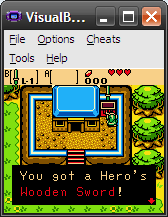 Magic, isn't it? But that's all. Hopefully you understand it! ~Lin |
|
|
|
|
548
|
Oracles Hacking / Lists / Ages Weapon List
|
on: June 26, 2010, 06:06:39 AM
|
|
Here's a list of weapons, be it equipped or in a chest.
00 - Nothing
01 - Shield
02 - Damaging Rod of Seasons (Missing graphics, even though they've been found in the ROM)?
03 - Bombs
04 - Cane of Samaria
05 - Sword
06 - Boomerang
07 - Glitched Harp of Ages
08 - Mystery Seed...?
09 - Blank
0A - Hook Shot/Long Hook
0B - Blank
0C - Biggoron's Sword
0D - Bomchus
0E - Animal Flute
0F - Seed Shooter
10 - Blank
11 - Harp of Ages
12 - Blank
13 - Mystery Seed...?
14 - Blank
15 - Shovel
16 - Bracelet/Power Gloves
17 - Roc's Feather
18 - Blank
19 - Seed Satchel
1A+ is blank.
~Lin
|
|
|
|
|
549
|
Oracles Hacking / Tools / Zelda Oracles Chest Reader and Fixer (Version 1.0.0.1)
|
on: June 26, 2010, 05:44:37 AM
|
Note: Fatories has developed a tool called ZOIC which does exactly what this program does and more along with seasons support. It would be wise to download ZOIC instead. Note: Updated to 1.0.0.1, which requires the 1.1 GBHL.DLL file (Which it comes with). Well, this is a small, yet powerful tool developed in about an hour. Basically, it will load a chest based on the ID (The one you put into the chest editor in ZOLE) and it will tell you what weapon it gives, the level of the weapon, the graphics displayed, and much more. It's a pretty simple tool but I'm sure many will find it useful. The reasoning behind it is there are many weapons in the game, and you can TRY to load them into the chest, but if the item wasn't originally obtained via chest, the game freezes (Unless you get lucky and the effect is 03). This makes it so you can make a chest give any weapon (And other items, but it hasn't been tested yet). 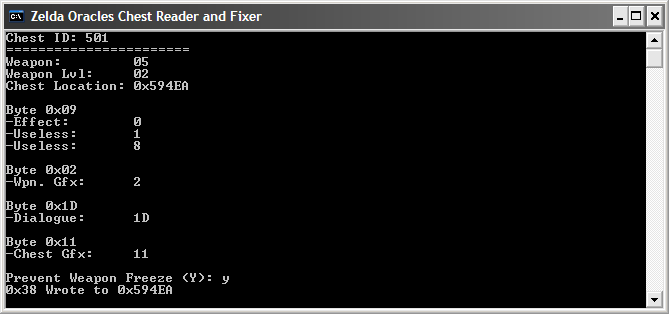 Do not ask me what the Useless values are. I haven't figured it out. But basically, that makes it so when you enter ID 501 into a chest, it gives you the Level 2 sword and doesn't freeze. Download: http://uppit.com/beqfh6hhsc99/ZOCF.zipHow to useMake sure your ROM is in the same directory as the program, and is type GBC or BIN. The file cannot be read-only. The program loads the first ROM file it finds, so be sure not to have two in the same directory. ~Lin
|
|
|
|
|
550
|
Oracles Hacking / Opinions and Experiments / Chest Reader
|
on: June 26, 2010, 04:54:30 AM
|
Well, in my hack I wanted to make the sword obtainable from a chest, but I guess by default there is no such chest value that does this (As far as my experimentation went). I also noticed a lot of freezes from random items, so I thought I'd see just makes what do what. Here's what I came up with.  1602 is the ID of the Power Gloves. I've played around with those "Useless" values quite a bit, but I never got anywhere. It turns out if the first byte of the ID is less than 0x20, it's detected as weapon. If anything greater, it's something else like money or a key. One thing I haven't figured out is what controls the level of the weapon. If the weapon is 05 (Which requires a run-time memory edit to not freeze the game), which is the sword, it turns out Level 3 instead of Level 1. I know there's a separate value in the memory for this, but I can't see why it's not by default 01. I know for a fact the level doesn't depend on the second byte of the chest ID, because a Level 3 Sword has 03 at C6B2, not 02. A 00 sword does no damage. But yea, just a small experimentation. Maybe it'll go somewhere further! EDIT: I guess the second byte does control the level. The byte that gets written is that + 1. ~Lin |
|
|
|
|
551
|
Oracles Hacking / Lists / Rupee Order
|
on: June 25, 2010, 10:13:59 PM
|
|
The list of rupees given when opening a chest (ID 28xx).
00 - 1
01 - 5
02 - 10
03 - 20
04 - 30
05 - 50
06 - 100
07 - 150
08 - 200
The list ends there.
~Lin
|
|
|
|
|
552
|
Oracles Hacking / Help / Common Questions and Answers
|
on: June 25, 2010, 09:57:19 PM
|
|
Thank you for checking this topic before posting a new one. Here you'll find some common questions and the answers to them. If your question isn't here, feel free to post a new one.
Q: When do I have to save for my changes to not be lost?
A: Basically when editing anything in the main window. All dialogues (separate windows) will write to the buffer as soon as you click OK on them. This means after the window closes (Note this doesn't apply if you hit the Cancel button instead) your changes are technically saved. But, no matter what you do, the only way to write to the real file is to click the Save button.
Q: Why isn't my chest working?
A: First off, make sure the YX is the same location as your chest's location. If your Item is freezing make sure to use ZOCF to fix that.
Q: How do I edit Minimaps and Dungeon names?
A: You can't edit minimaps yet Look at the Dungeon Minimap Editor, and for dungeon names, look in the Tutorials section.
Q: How come the game froze after going into a room?
A: You have added too many interactions. Try not to add more than 10. Some interactions may write more to the memory than others, so be careful.
Q: Why does ZOLE crash when I open my ROM?
A: Obviously, be sure its a Zelda Oracle of Ages (U) or Zelda Oracle of Seasons (U) ROM. Second, the file size must be 1MB. Third, make sure it's not read-only. To do this, right-click on the file, click "Properties", and un-check "Read-only".
Q: How can I make my own tilesets?
A: You can't make your "own" tilesets, however using the handy dandy tileset editor in ZOLE you are able to edit the various tilesets in game. Keep in mind, the tile properties cannot be edited. Use the tileset editor or re-decompress tilesets tool.
Q: When will you add full Seasons compatibility?
A: Some time in the future. Maybe.
Q: How can I edit cut scenes like the credits or the intro?
A: You can't, and you never will be able to. Simple as that.
That's it for now. If you have any suggestions, feel free to post them.
|
|
|
|
|
553
|
Oracles Hacking / Lists / Re: Music List (Ages)
|
on: June 25, 2010, 03:50:58 AM
|
|
Thanks for this! Also, 25 is the Past Symmetry Village. 1C is the cutscene music and I think it's used in one of the final dungeons.
27 Is Subrosia... Even in Ages. This probably means this music list is the same for Seasons too. 40 Is the third piece of music in the intro scene.
|
|
|
|
|
554
|
Oracles Hacking / Bug Reports / Re: Possible bug with global map scripts
|
on: June 25, 2010, 02:31:20 AM
|
|
Oh, then I guess I was wrong, and only 0x124A7 is used. Also, for the second one, there are several calls and jumps, so could you do me a favor and tell me the base address the group gets added to (Like the other one is 0x124A7). If you could, that'd be great and save me loads of time.
Edit: Alright, I'll do that instead, since there is quite a bit of space at the bottom right of the editor. Also, the prompt is there because it can take time people don't want to give up. It's faster on some computers and slower on others, so I always have the user confirm if they want it updated.
Edit 2: Hmm... I guess I had an error in my code. Both script checks seem to be 0x124A7, as when I fixed it script 0C was detected at that Level 6 map.
|
|
|
|
|
555
|
Oracles Hacking / Bug Reports / Re: Possible bug with global map scripts
|
on: June 25, 2010, 12:55:27 AM
|
Hmm... Well, I didn't change the region header and found the bug with events was somewhere else. Basically, map swapping wasn't working at all thanks to my custom loading script, but it's all good now and a new script is added at bank 54. And I see it impossible for a map script to not be detected, because the game checks the map you're heading into 3 times (Or maybe it's 4. I have the 0x11F5F check commented out, so maybe that's why). I was always unsure about the other interactions... The code seemed a bit edgy and I hadn't tested it outside of dungeons, so I'll look into that. And at the room arranger, I thought I had it so maps get set before you press OK... But if not, I'll make sure it happens. Thanks. Oh, and can you give me an example of a room that has a script? EDIT: I guess I had the wrong bank for one two of the checks, so that's probably why it wasn't detecting them. But still, can you give me one of the rooms? EDIT2: Aah, I found the interaction bug. First off, I noticed existing interactions don't get messed up. Second, there only seems to be one set of messed up interactions which get applied to every map that didn't already have them, which is at 49977, so pretty much all I have to do is make sure it doesn't write to there or anywhere near it because that's where the no-interactions are at. EDIT3: Fixed the interactions bug... Basically adding interactions would clear out the old ones, and since the ones with no interactions do technically have interactions, it replaces the FF at 49977 with 0 and since the byte immediately after that is F2, a bunch of interactions get added randomly until FE/FF is hit. Also, the room arranger originally worked how you requested. Notice how if you change a room, the selection box becomes blue. Blue indicates changed and red indicates the same. I don't know why you thought you could only change one at a time though  |
|
|
|
|