Show Posts Show Posts
|
|
Pages: 1 ... 4 5 [6] 7 8 ... 15
|
|
77
|
Oracles Hacking / Help / Re: A small patch of sand?
|
on: July 11, 2011, 08:31:28 PM
|
|
It is a map script that causes the sand tile to appear there. In ZOLE if you go to an unused room in your hack and open up the map script chooser and swap with maps 98 it will remove the map script from 98 which will stop that tile of sand from appearing.
|
|
|
|
|
78
|
Other / General Discussion / Re: Hello
|
on: July 11, 2011, 04:36:36 PM
|
Welcome to the forums Kishin, I hope you enjoy your ZOLE hacking experience  If you end up making a hack definitely post screen shots, screen shots feed everyone on the forums, and if you have any questions feel free to ask for help here on the forums or on the ZOLE IRC (check the IRC topic in the announcements forum for details). |
|
|
|
|
79
|
Oracles Hacking / Bug Reports / Lollollol Look who is back
|
on: July 09, 2011, 03:40:57 PM
|
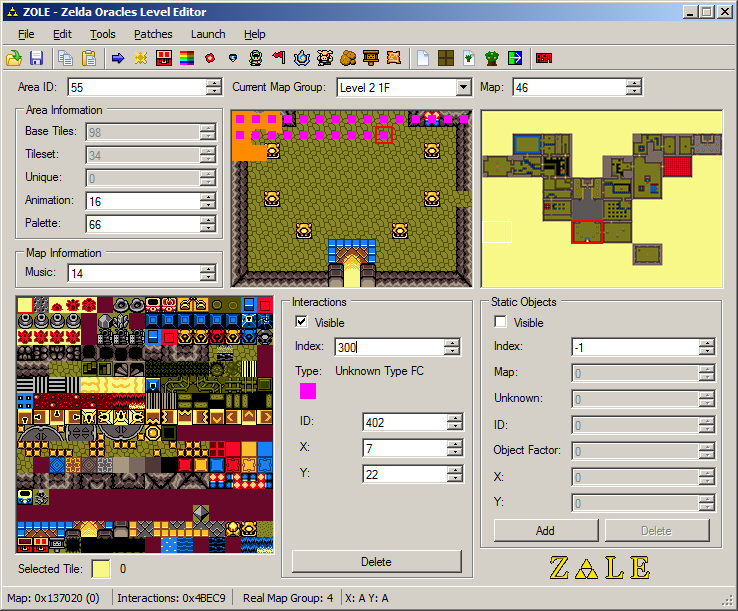 Now I don't like to brag, (ok I do) but that is a lot of interactions. And that lot of interactions has royally destroyed the ROM I use. Oh well the ROM isn't important all that was there was some shitty lost woods some loser made and stuff. What is important is that Sir Loser McFace has returned, of course this only happened one time so I wouldn't think too much of it, but just have to let you know Lin. |
|
|
|
|
80
|
Oracles Hacking / Help / Re: Compiling Original Scripts on the Overworld
|
on: July 05, 2011, 11:06:25 PM
|
|
Im pretty sure you mean decompile.
ZOSE will only decompile dungeon specific events (20xx) and custom scripts 72xx to a readable, editable state. This is because 20xx and 72xx point directly to the scripts. You wont be able to view scripts that are on the overworld using ZOSE
|
|
|
|
|
81
|
Oracles Hacking / Lists / Memory Address List
|
on: July 05, 2011, 08:29:37 PM
|
|
Here is an extensive list of memory addresses for various things in the Legend of Zelda Oracle of Ages. This is for Oracle of Ages ONLY. Although OoA and OoS (Oracle of Seasons) are very similar the memory addresses are not in the exact same locations, nor are values the same. You can use these memory addresses in the VBA (Visual Boy Advance) Memory Viewer to edit various aspects of the game, or if you have knowledge on gameshark codes you could easily make them into gameshark codes for stuff such as permanent pegasus seed use.
Table of Contents:
- Life/Rupee Addresses
- Item Addresses
- Inventory Addresses
- Item count
- Weapon/Item Level
- Miscellaneous Item Addresses
- Ring Addresses
- Animal Addresses
- Miscellaneous Addresses
- Credits
Life/Rupee Addresses:
Rupees:
C6AD - The first byte the game reads your rupee total from. Changes the ones and tens digits (0-99 rupees).
C6AE - Second byte, changes the hundreds digit (100+ rupees)
Life:
C6AA - Your current life in-game
C6AB - Total amount of hearts you have
Item Addresses:
Inventory Addresses:
C688 - B Button
C689 - A button
C68A-C699 - Slots 1 to 16 on inventory screen.
Item Count:
C6B9 - Number of ember seeds
C6BA - Number of scent seeds
C6BB - Number of pegasus seeds
C6BC - Number of gale seeds
C6BD - Number of mystery seeds
C6BE - Number of gasha seeds
C6B0 - Number of Bombs
C6AC - Number of pieces of heart
C675 - Number of small keys
Weapon/Item Level:
C6B2 - Sword Level
C6AF - Shield Level
C6B8 - Power Bracelet Level
C6B7 - Harp of Ages songs obtained
Miscellaneous Item Addresses:
C6BF - Essences (FF = all essences)
C69F-C6A5 - Secondary Items (FF in all for all items with mermaid suit, or FF in all except C6A3 with FB for all items with flippers)
C69E - Seeds obtained for use (FF = all seeds)
Ring Addresses:
C616-C61D - Rings obtained in ring list (FF for all rings in each list)
C6CC - Level of Ring Box
C6C6-C6CA - Rings in Ring Box
C6CB - Ring currently equipped
C6CD - Number of Rings (resets on inventory open)
Animal Addresses:
C6B5 - Animal flute icon(01 Rickey, 02 Dimitri, 03 Moosh)
C610 - Animal Song+Animal+Map Features (0B Rickey, 0C Dimitri, 0D Moosh)
Miscellaneous Addresses:
D00D = Links X position
D00B = Links Y position
CC99 = The tile coordinates that Link is standing on (YX)
CC9A = Tile ID that Link is standing on
CC2D = Active map group (00 present overworld, 01 past overworld, 02 present underwater, 03 past underwater, 04/05 dungeons, 06-07 side scrolling rooms)
CC2F = Map backup/real map to go into
CC30 = Active map
CD23 = Active map tileset
CD25 = Active map animation
CD28 = Active map unique
CD29 = Active map palette
CC48 = Map to warp into
CE00-CEBF = Collision data (Same bit style as D033)
CF00-CFBF = Map data
Pegasus Seed timer = CC6C
Pegasus Seed timer loop = CC6D
D033 Bits:
00 - regular walking
C0 - touching up
0C - touching left
30 - touching down
03 - touching right
10 - top left corner (top end)
01 - top left corner (left side)
02 - bottom left corner (bottom end)
40 - bottom left corner (bottom end)
80 - bottom right corner (bottom end)
08 - bottom right corner (right side)
20 - top right corner (top end)
04 - top right corner (right side)
Note: Values can combine such as if you are touching both left side and top side, D033 will become CC
Note2: When pushing up against an object, D034 is set to 10.
Credits:
Oracle of Ages Memory Address document written by Fatories. Special thanks to Lin for giving some memory addresses and helping with a few things.
Other than a few memory addresses given by Lin, all were found using the VBA memory viewer by myself.
|
|
|
|
|
83
|
General GameBoy Hacking / General GameBoy Talk / Re: Least Favorite Area/Dungeon/etc in Ages
|
on: July 02, 2011, 10:19:20 PM
|
|
Mine was probably the whole level 6 region (whatever it might be called). It wasn't that the ideas were bad or anything, but when playing I hated how you constantly had to play mini games, get an item, move on to the past and do more mini games and crap. I also hated how its all pretty much the same mountain area as level 5, it felt to me as a kid when playing that I was on those mountains for an eternity, when really I wanted to get back to exploring the world and filling my map.
|
|
|
|
|
85
|
Oracles Hacking / Finished Hacks / Re: The Legend of Zelda, The Oracle of Hours Beta out now! (Version 1.1)
|
on: June 16, 2011, 06:28:26 PM
|
So I'm up to the Beach Cave and there's been a few stray bugs here and there.
Like chests in areas with no obvious puzzle. I'm in a room in Beach Cave and I lack a small key. There's a tone in the room with two vases in a maze-like area. What am I supposed to do?
That's not Luigi's fault, ZOLE cannot edit the minimaps/compasses of dungeons. As of now, dungeon compasses are completely useless and will only throw people off if you use them, so dont listen to it. Luigi has posted all the maps of his hack so if you are stuck just look at them because they tell you what's in each chest. |
|
|
|
|
86
|
Oracles Hacking / Tutorials / Making a Weapon Obtainable in Side Scrolling Areas
|
on: June 11, 2011, 03:48:55 AM
|
So you've been at ZOLE for a while, working with those dem fine chests, and you've finally come to the point in your hack where you need an item to appear in a side scrolling screen (like the power bracelet or rocs feather). Now you're a smart person and you've tried, you've looked for all possible ways to do this before coming to the tutorial but you've finally given up on doing it. Well don't worry I'll teach you how to do this step by step. You will require ZOIC and ZOSE for this tutorial.1. You will need to make a custom script in your room using ZOSE. If you are unfamiliar how then you better go learn how, I have a tutorial on it which can be found here: http://zeldahacking.ulmb.com/index.php?topic=274.new#newIn this script you will have to write to simple lines. writelocation xxxxx
setinteraction72 xx
checkitemflag
spawnitem X Y The code may need to be altered around a bit with such things as "set coords", I trust if you are following this tutorial you could at least be able to figure that out. The X should be your weapons first ID and the Y should be the second one (For power bracelet 16 00, etc). Check out the weapon list here for your weapon ID: http://zeldahacking.ulmb.com/index.php?topic=10.02. Open your ROM in ZOIC. In ZOIC enter the ID of your item (1600 for the bracelet, etc) and values should be loaded. In the item property value change whatever you see there to 0A. Then click the change item button. There you go folks, three simple steps to making an item appear in your side scrolling room. |
|
|
|
|
87
|
Oracles Hacking / Lists / Standard Dungeon IDs
|
on: June 06, 2011, 01:14:54 AM
|
|
This is just going to be a short list of interactions/items you would mostly use inside of a dungeon. If you feel I should add something, then go ahead and leave a message, I'll most likely add it in.
Chest IDs:
Small Key - 3003
Boss Key - 3103
Dungeon Map - 3302
Compass - 3202
Type 2 Interactions:
Small key that falls down when enemies are killed - 1201
Chest that appears when enemies are killed - 1202
Chest that appears when switch is stepped on - 2117
Switches (Type 8 Interaction):
90x - Switch that stays pressed
98x - Switch that doesnt stay pressed when stepped on.
* - The "x" value depends on how many switchs of that type are in the room. 900 for the first switch, 901 for the second, 902 for third, etc. Same with 98x.
|
|
|
|
|
89
|
Oracles Hacking / Tutorials / Changing Type 2 Interaction DA00 Warp
|
on: June 03, 2011, 02:09:58 PM
|
So I had this idea in my hack where at one point I needed a warp, something like the one on map F1 of map group 5 (Twinrova/Ganon battle warp, when you go to rescue Zelda). Now I could have spent my time building my own script, but rather than doing that I decided I'd find the address for the interaction and edit it myself. After about half an hour (give me a break, I've never done this before  ) I finally was able to find the address for a few things, and here they are: 0x4BD4 - Keep first number as an 8. Second number is destination group. 0x4BD5 - Map you are being teleported to. 0x4BD6 - After the inital warp, this is how you will enter the map you get teleported onto (0x05 is the traditional fall down from above). 0x4BD7 - The position you will be put on, YX form. Thats pretty much all you need for editing, at least thats all I needed so I didn't test anything else. Basically, just change the bytes to the appropriate values. Don't forget to add the type 2 interaction DA00 into your map, it will activate when Link steps on it. |
|
|
|
|