|
302
|
Oracles Hacking / Progress / Re: Tileset Editor
|
on: January 22, 2011, 06:56:39 AM
|
|
Well, it is a pretty big window. THAT would be your resolution's fault - the window is normal sized but it's very large (probably over 800x512). And yes, a pic would be good (print screen + paste into paint, save, upload as an attachment here).
|
|
|
|
|
304
|
Oracles Hacking / Help / Tileset Editor - Not Showing Changes In-Game
|
on: January 21, 2011, 10:10:00 PM
|
|
This topic is only for users who opened their ROM with ZOLE 1.13 or under and opened it again before 1.14.5
If you have a ROM that's 2MB and you used ZOLE 1.14.2, 3, or 4, you will not see the changes you made to tilesets in-game. This is fixed in 1.14.5. To fix this, click on the ASM button, or the Re-apply ASM Patches button. This will fix the issue.
~Lin
|
|
|
|
|
305
|
Oracles Hacking / Tutorials / Re: Tileset Editor Controls
|
on: January 21, 2011, 10:08:07 PM
|
|
It can edit everything except collisions, mainly because collisions don't really need to be edited, and I haven't found the data. Even if I did find the data I wouldn't integrate them anytime soon.
|
|
|
|
|
306
|
Oracles Hacking / Progress / Re: Tileset Editor
|
on: January 21, 2011, 10:07:01 PM
|
|
It has nothing to do with the monitor. The pixels are stretched based on the existing pixels, and all of it is done with math - none involving the monitor's resolution. The selection and hover box also involve math and just detect the cursor's position. If it works in the other things in ZOLE, like the map picture box, it should work fine. I really don't know what the issue is.
|
|
|
|
|
308
|
Oracles Hacking / Progress / Re: Tileset Editor
|
on: January 21, 2011, 05:31:56 AM
|
It shouldn't. I use XP and have used the Classic and Luna theme and they both work fine. We also use the same .NET Framework, so it should be good. Here's what the window should look like (this one's missing the undo/redo): 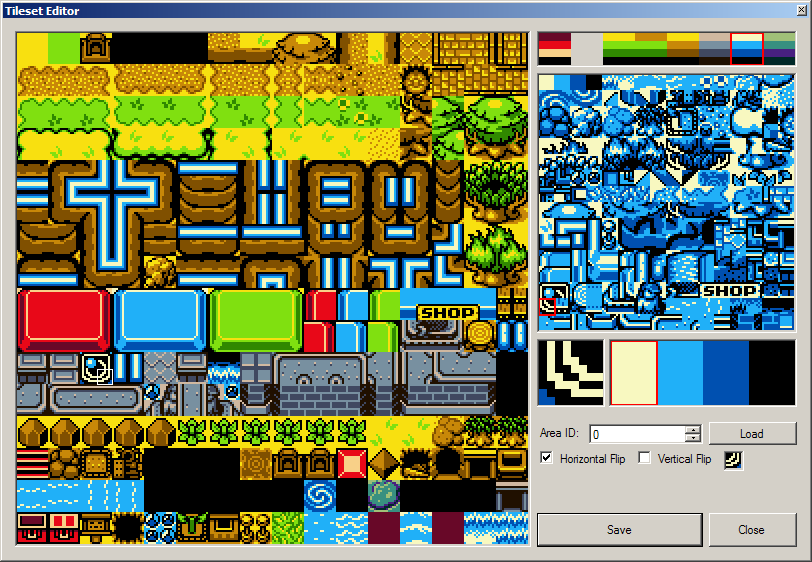 Would you mind showing me what yours looks like? |
|
|
|
|
311
|
Oracles Hacking / Progress / Re: Tileset Editor
|
on: January 21, 2011, 02:57:59 AM
|
|
Yes, all the stretching is intentional. That's to make editing easier. Even with things stretched, everything else should be aligned properly.
|
|
|
|
|
313
|
Oracles Hacking / Progress / Re: Tileset Editor
|
on: January 20, 2011, 10:03:13 PM
|
There's a bug. First of all, you can only access the tileset editor from the icons in the editor. If you try to select it from the Tools menus, it doesn't work. Second of all, when the tileset editor loads, the graphics and the cursor are not aligned properly. That is to say the tiles are blow up, but the cursor select map is still small. Not only are the cursors out of alignment, but you think you are clicking on a tile, and it's a different tile. Also the tiles at the bottom arn't clickable, and to click them you have to click on the tiles way above them.
Everything works fine for me. It's your computer and it's not likely I can do anything about it. Except for the button only working on the icon. That's my fault. |
|
|
|
|
314
|
Oracles Hacking / ZOLE / Re: ZOLE 4 Version 1.14.3 Released!
|
on: January 20, 2011, 06:24:29 AM
|
|
Version 1.14.3. Update log from ReadMe:
Fixed a bug with tileset's history overloading. Also fixed Seasons loading.
This will be the last update of the night. Any bugs, oh well. They will be fixed tomorrow. However it's unlikely there are any.
|
|
|
|
|



 Show Posts


