|
511
|
Oracles Hacking / Lists / Re: Ring List
|
on: June 29, 2010, 02:04:00 AM
|
|
I think a lot of the ??'s in your list has to do with them being obtainable from a Gasha Tree. If you use ZOCF with a lot of the blanks they might work. Awesome list anyway though!
|
|
|
|
|
512
|
Oracles Hacking / Help / Re: Maple
|
on: June 29, 2010, 01:53:03 AM
|
At B732 is the list of bits that determine if Maple shows up or not. One byte equals 8 rooms. Oddly enough, there are 3 region entries for maple, and 4 are defined as bitmasks. Also above there somewhere is Maple's appearance ASM. 41C6 is Maple's kill counter.
Hmm... Either that image is wrong or I had the bitmap wrong. I'm gonna look into it. |
|
|
|
|
517
|
Oracles Hacking / Tutorials / Adding your Own Enemies to Maps
|
on: June 28, 2010, 10:28:31 PM
|
|
As of version 1.03 and under - Do not use more than one Type 6 spawn!
So I bet you're wondering how to create enemies without using the existing enemy spawn groups. No problem. Before we start, let's get this out of the way:
Type 6 Interactions - A Random-Positioned enemy (Purple)
Type 7 Interactions - A regular enemy with its own set position (Also seeds and some other stuff) (Brown)
So, first off decide which you want. Type 7 is most common in dungeons, as it's more of a challenge not knowing where your enemies are. But personally, I prefer position-specific ones.
Basically, all you do is create one of those types and set its ID and maybe position. For type 7, ignore the Quantity value. This can pretty much always be 00. But, if it's type 6, read on.
The quantity value in Type 6 is actually kinda weird. 00-1F will spawn about 20 enemies of the specified choice. Only bits 5, 6, and 7 are used. To find out the proper quantity, take a look at this list.
1 Spawn - 20
2 Spawns - 40
3 Spawns - 60
4 Spawns - 80
5 Spawns - A0
6 Spawns - C0
7 Spawns - E0
When using Type 6, be sure to use one of the values above, or else you'll end up with several spawns and the game will be very slow.
There's an enemy list in the Lists section. Check that out for a list of almost all the enemies.
~Lin
|
|
|
|
|
519
|
Oracles Hacking / Help / Re: Initial Music
|
on: June 28, 2010, 10:19:47 PM
|
|
Yes, there is a patch for this thanks to Jigglysaint. Patches > Ages > Remove Beginning Locks. This will allow you to press Start and Select too.
|
|
|
|
|
520
|
Oracles Hacking / Help / Interactions - What Are They?
|
on: June 28, 2010, 10:19:02 PM
|
|
Well, simply put, they're things you interact with. They can be events, npcs, items, or portals. Interactions are grouped into categories based on my best judgement, and each have their own color based on their type.
The main ones you're going to be seeing are red (ASM Pointer), yellow (Pointer to a bunch of other interactions, or enemy group spawn), and orange (Mainly used for straight-up items, NPCs, and some events).
Now, right now, I'm doing a lot of studying to see how to increase editing flexibility without making it complicated to the user. But here's something I've gathered.
Let's say you find an NPC, or type 2 interaction that only shows up some times. If the right 2 digits of the ID are greater than 0, change them to 00. For example, look at the old man south of the main town in Ages. His ID is 4403. Now, if you were to copy his ID and place him somewhere, and visit him on a new save file, he won't appear. Change the 03 to 00 and he will.
What happens is nearly every interaction in the end leads to ASM, which is the GameBoy's processor code (Or any processor code for that matter). It's kind of complicated, but is actually easier (How ironic!) than real programming once you get the hang of it.
"Thanks Lin, that just confused me even more." Well, if you're a beginner, obviously you're not going to find much use of this. However, over time I will be posting tutorials on the Tutorials Section on how to get the ID you want to make what you want.
~Lin
|
|
|
|
|
521
|
Oracles Hacking / Tutorials / Creating Custom Dungeon Walls/Floor/Base Tiles
|
on: June 28, 2010, 09:43:55 PM
|
Well, I wouldn't imagine many people will actually take use of the feature built-in to ZOLE, but I guess it's because they don't understand how to. So, here's an example of using custom floors with your dungeon (Ignore the palette).  So normally these graphics are all compressed, but ZOLE can decompress the base graphics to allow for editing and they show up pretty much instantly. Before we start, you're going to need a graphics editor. I recommend Tile Layer Pro. It's basic, but it gets the job done. Now, load the area or base tiles you want to edit. Next, go to Tools > Decompress Graphics > Selected Tileset Base Tiles. If it worked, you'll probably see "Decompressed to 0xE2AF0". Keep note of the number it shows. Next, open up TLP or your graphics editor, and open your ROM (AFTER SAVING IN ZOLE FIRST). Go to the address it told you about and you'll see something like this. 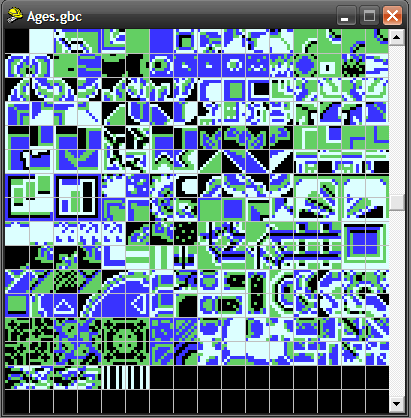 Pretty ugly palette huh? On the Palette Editor, I suggest making it look like this.  Okay. So now you have a bunch of raw tiles just sitting there. So what do you do with them? Well, here's a short map that shows you what's what. 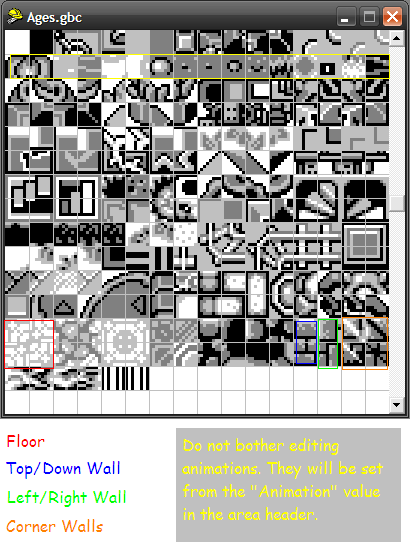 To know what color does what, open the Palette Editor in ZOLE. For example, the floor palette is 2. So, placing a white pixel will appear to be very light brown, a light gray pixel will be brown, etc... Once you've edited the tiles, click Save and Re-open it in ZOLE. If you don't, ZOLE will overwrite it with what it had in the file buffer before. And besides, once you do that, you get to see your changes! You can use this for the base tiles in the overworld tilesets, along with anywhere else, but keep note you can't edit EVERY tile that gets shown (Mainly the middle ones that actually change), but it's still cool, because you can have your own trees and such. ~Lin |
|
|
|
|
522
|
Oracles Hacking / Discussion / Re: Enemies
|
on: June 28, 2010, 09:23:12 PM
|
|
Your best bet would be to create a base enemy list. What an enemy spawn group is is just a pointer to a group of regular NPC spawns, mostly of types 6 and 7. If we find out the IDs of those (Like 34 00 is a green blob, 34 01 is a red blob), we would certainly be better off without using custom enemy group spawns (Or just interaction pointers). The whole idea was to save space.
|
|
|
|
|



 Show Posts


